Target Tracking (TT), AIS and Target Association
RadarHow radar target tracking (TT/ARPA) and AIS feed collision avoidance: what each gives, their errors and limits, and how the radar merges both into one associated target. Knowing which data to trust keeps you safe in traffic, and it is core Malta radar exam material.
Last reviewed 1 Nov 2026 · From a professional captain's years of study notes · Organised with AI and checked against current regulations · How we write
On this page (10)
Radar’s role in collision avoidance
In short: COLREG expects you to use radar for lookout and collision avoidance, but radar is one source among several — never the only one.
- Radar use is written into COLREG (lookout, risk of collision, restricted visibility). It is a key tool for both the lookout and collision avoidance.
- The aim is action that is positive, early and appropriate (COLREG Rule 8). Radar links the chain: lookout → safe speed → risk of collision → action.
- Never rely on radar alone: combine it with eyes, ears, AIS and VHF information.
The four jobs of radar
- Detect other vessels early → early warning that a risk may develop.
- Get their motion data — by manual plotting, TT (ARPA), AIS or TT–AIS association — to judge the risk and act.
- Check what the other vessel is doing, and whether both ships’ actions are working.
- Decide when to resume course and speed, once you will pass at a safe distance.
What radar can and cannot do
- Radar is an active sensor: it sees every surface target, shorelines included — the full traffic picture, not only ships that transmit AIS.
- Its output is only as good as every connected sensor: radar sensor, AIS, EPFS (GNSS), SDME (log), THD (gyro) and ECDIS.
- Target tracking limits: acquisition errors, omissions, target swap and loss; the screen size caps how much can be shown; processing adds a delay, and the delay adds error.
- Cross-check with sources that do not share inputs: never verify GNSS with another GNSS-based system. Radar is standalone; ECDIS takes GPS and AIS. Use the radar overlay, visual position lines or celestial. Overlay off the chart → one source is wrong, usually the EPFS — trust the real echo.
- Radar video goes to the VDR (the ship’s black box: bridge and wing microphones, VHF/MF-HF, ECDIS, conning display, radar, CCTV). It records in a loop (class: usually at least 7 days) and the saved period is admissible evidence in investigations and court — mind what you say on the bridge. The instructor noted VDRs are required from 3,000 GT.
- Over-reliance sinks ships: a fishing vessel with a flattened bow; a wind-farm vessel whose officer, on his phone, hit a turbine; GPS-spoofing groundings — “are you not looking out of the window?”
Setting up the radar for collision avoidance
- Sea-stabilised (speed through the water) — this shows the true relative approach (OA) of the other ship.
- Relative motion.
- North-up or course-up. Head-up is not recommended.
When the Master is called
- Time is critical. The Master must know the radar set-up and controls by heart, to assess the picture fast.
- First look out of the window, then at the radar. Ask the OOW for a briefing only when there is no imminent danger.
- OOWs sometimes delay calling the Master for fear of a bad reaction. Standing orders (e.g. “call me for fishing vessels within X NM”) remove the doubt — follow them.
Why early action pays
- On the bridge: plots at 08:00, 08:06 and 08:12 show a risk. Act now and a few degrees are enough. Wait until 08:18 and you need a much bigger alteration.
- Rule of thumb: a few degrees in good time avoid a 20–30° alteration later.
- Keep watching until finally past and clear — overtaking, crossing or head-on — then return to your course gradually.
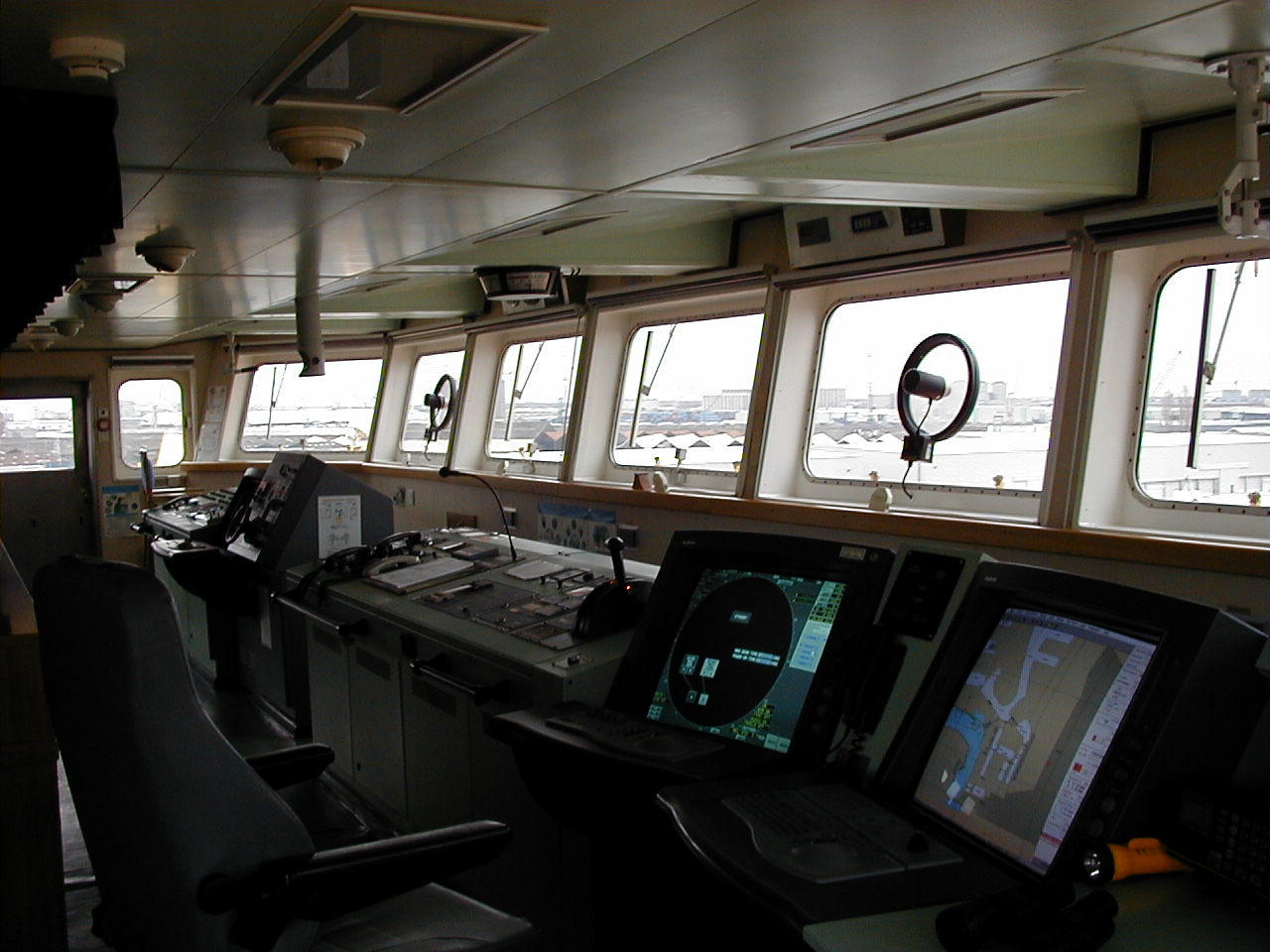
Target tracking (TT/ARPA) — what it gives
In short: TT is the radar’s automatic plot. After the visual and audible lookout, it is the primary collision-avoidance tool.
- Compared with manual plotting, TT handles more targets, faster, continuously and more accurately.
- It is still an aid: it does not relieve you of a proper lookout (COLREG Rule 5).
- You may use TT data for COLREG decisions, as long as you verify it by other means (visual bearings, a manual plot).
How tracking works
- Acquisition: manual (you select the echo), automatic, or by a guard zone. The operator must always be able to acquire and cancel targets manually.
- The target first goes through an acquisition phase (box symbol), then the tracker settles. Expect steady data after about 3 min.
- Capacity in the older IMO ARPA standard: 20 targets with automatic acquisition, or 10 with manual acquisition only.
What TT tells you
- Range and bearing of the target.
- Its calculated course and speed (true vector).
- CPA and TCPA — closest point of approach and time to it.
- BCR and BCT — bow crossing range and time.
- If some own-ship inputs fail, TT can still give at least CPA and TCPA, because they come from the relative track.
TT problems and limits
In short: TT can grab the wrong echo, follow it badly, lose it, swap it for another, and it always runs a little late.
The five problems
- Mis-acquisition — the tracker locks onto the wrong echo, clutter or a false echo.
- Mis-tracking — the vector does not follow the real movement of the target.
- Target loss — the echo fades or is hidden; the radar gives a lost-target alarm.
- Target swap — two echoes come close together and the tracker jumps from one to the other. Clutter and a long pulse (poor range discrimination) make it more likely.
- Processing delay — the calculation needs time, so the data always lag reality a little, especially after the target alters.
What causes them
- Equipment performance.
- Human factors: wrong settings, inexperience, careless observation, rash reaction.
- Environment: clutter, weather.
- Target blocking: one echo hidden behind another or behind land.
- Target manoeuvring: an alteration takes time to show in the vector.
How accurate is TT?
| Condition | Accuracy (IMO MSC.192(79) 5.25.4.7.1 / IEC 62388) |
|---|---|
| Target position, ship rolling up to ±10° | Range 50 m or ±1% · bearing 2° |
| Steady-state tracking | Speed 0.5 kn or 1% · course 5° |
- Accuracy gets worse in heavy weather.
Sensor errors — garbage in, garbage out
In short: TT works out a target’s true motion from your own heading and speed. Feed it wrong inputs and the true vectors lie — but CPA and TCPA stay right.
- Gyro (THD) error → affects true bearings only; relative bearings are fine. It corrupts the target’s true course, speed, vector and PAD, which can lead you into a wrong decision.
- Log (SDME) error → the same corruption of the target’s true data.
Why, on the O-W-A triangle
- OA = the target’s relative track, measured by the radar itself.
- WO = own ship’s vector, built from heading + speed inputs.
- WA = the target’s true vector, worked out from the other two.
- Gyro error → WO points the wrong way → WA is wrong.
- Log error → WO has the wrong length → WA is wrong.
- OA does not change, so CPA and TCPA are unaffected.
On the bridge
- You are doing 10 kn but the log is stuck at 4 kn. Own vector is too short, so every target’s course and speed is wrong. The relative track O→A, and so CPA/TCPA, is still correct.
- This is why the true vector of a target must be read with care when you suspect a sensor fault.
AIS — what it sends and why it can be wrong
In short: AIS gives you the other ship’s identity and its own navigation data. Useful, but only supplementary — it is never a substitute for radar tracking.
What AIS transmits
- AIS works on VHF. Inputs on board: GNSS, log, gyro, rate-of-turn indicator.
- Static data (every 6 min): name, call sign, MMSI, type of vessel, length, beam.
- Dynamic data: position, COG and SOG, rate of turn, nav status — every 2–10 s under way, every 3 min at anchor.
- Voyage data (every 6 min): destination, ETA, persons on board, type of cargo, draught.
- It can also send short safety text messages.
- Class A AIS uses SOTDMA (self-organising time division multiple access): it books its future transmission slots in advance.
The four error sources
- GNSS accuracy: AIS position is only as good as the other ship’s GNSS, which depends on the system and the environment. During GNSS trouble (e.g. solar flares) AIS targets can jump about erratically.
- No integrity indication: you cannot check the other ship’s sensors. Caution: in fishing areas, AIS fishing buoys can fill the screen — common in Asia (China, Malaysia); off Brazil (Macaé–Rio) nets can run 20–30 km.
- Update interval: dynamic data come every 2 s to 3 min, depending on how the ship is manoeuvring; a busy VHF data link (VDL) often stretches it further.
- Improper settings: wrong GNSS antenna position (not matched to the CCRP) or wrong static data → direct errors in CPA and TCPA.
Nav status and stale vectors
- The nav status decides how often the ship reports: under way about 2–10 s, at anchor or moored up to 3 min.
- A ship that has weighed anchor but still shows “at anchor” sends a stale vector: it may have altered or slowed minutes ago.
- Some modern AIS sets warn when the status is “at anchor/moored” but SOG is above 0.1–0.2 kn.
Static data typed in by people
- AIS is someone else’s data: their GNSS, plus static data typed in by a person.
- Fishing vessels have been seen declaring 100 × 30 m when they are really about 5 × 3 m.
- On some yachts the length is wrong: it was set at installation and the crew cannot change it.
ARPA or AIS for collision avoidance?
In short: base your decision on ARPA. Use AIS to identify the ship, to call it and to fill gaps.
| ARPA (TT) | AIS | |
|---|---|---|
| Data from | Your radar and sensors | The other ship’s GNSS and typed-in data |
| Responsibility | Yours — control and maintenance | The other ship’s |
| Stabilisation | Sea-stabilised (STW), relative | Ground (COG/SOG) |
| Ships without AIS | Seen (e.g. a dead ship, small craft) | Not seen |
| Speed of data | About 3 min to settle | Almost instant |
| Identity | None | Name, MMSI, type, nav status |
- AIS cannot replace radar for COLREG decisions, but it improves situational awareness.
- There is no explicit provision for AIS in COLREG (MGN 324 (M+F) Amendment 2).
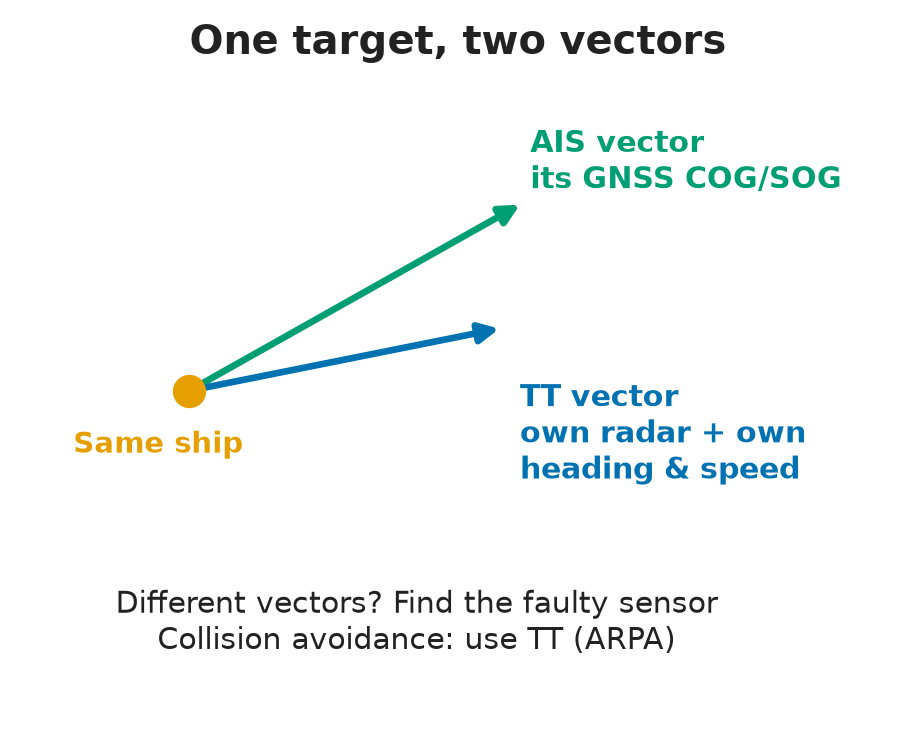
- If AIS and the radar echo disagree, trust the echo — it is a real reflection, not a reported position.
VHF calls
- In theory, VHF is not a collision-avoidance tool. In practice, most ships call — and AIS gives you the name to call. AIS text messages are also possible.
- Early, clear action usually makes the call unnecessary.
- Exam: never give “I would call him on VHF” as your avoiding action. It is not in COLREG, and MCA guidance (MGN 324 (M+F)) warns about misunderstandings and about taking the OOW’s attention away from the lookout and the plot.
Where AIS shines
- Ship-to-ship (STS) transfer: lock onto the other ship by AIS at about 50 NM.
- Pilot boats and launches find their ship from its AIS range and bearing.
TT–AIS association
In short: when TT and AIS describe the same ship, the radar merges them into one target with one symbol and the best combined data — provided both inputs are good.
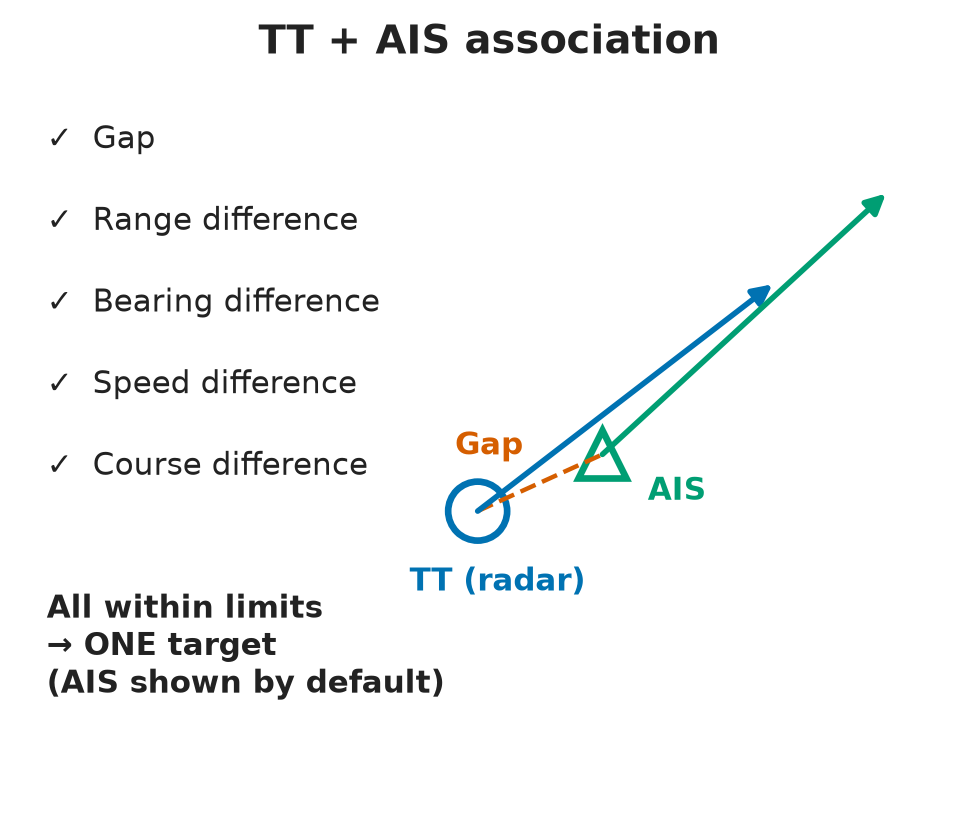
- Association = the radar combines the TT and AIS data of the same physical target into one symbol with consolidated data (IMO MSC.192(79)).
- Independence: the two sources are separate and not synchronised, so some difference between them is normal.
- Interdependency: for the same target, each data set supports the other.
- By default, an associated target shows the AIS symbol and data (IMO MSC.192(79)).
- The fused position sits between the radar position and the AIS position — the best of both, but only if both inputs are true.
Cautions
- Association algorithms differ between makers.
- It needs reliable sensor data on both sides.
- An error in one system → two different vectors for the same target.
Association criteria
The operator sets limits for the difference between the AIS and the TT target in:
- Gap — distance between the two positions.
- Range.
- Bearing.
- Speed.
- Course.
All within limits → the radar treats them as one target.
Setting the criteria
Choose them for traffic density, equipment accuracy and weather and sea. Rules of thumb:
- Ship spacing: in the open sea usually more than 1.5 NM; even in heavy coastal traffic rarely less than 0.8 NM. Limits wider than the spacing would merge two different ships.
- TT accuracy with roll up to ±10°: range 50 m or ±1%, bearing 2° (IMO MSC.192(79) 5.25.4.7.1 / IEC 62388).
- Steady-state TT: speed 0.5 kn or 1%, course 5° — worse in heavy weather.
- The AIS reporting interval varies with the maker and the VDL load.
Why does AIS take priority on the display?
- AIS delivers full data in a second; ARPA needs about 3 min to produce reliable data.
- The AIS priority in IMO MSC.192(79) is for displayed information only. For collision avoidance, use ARPA.
The three key sources in heavy traffic
- For consolidated and optimal information on a target, use radar TT (ARPA) + AIS + TT–AIS association.
- Not manual plotting (too slow with many targets), not the visual lookout alone (may not see the target), not the GPS position (it does not identify the target).
⚡ Flashcards
Test yourself, one card at a timeQ1What are radar's four jobs in collision avoidance?
AnswerDetect ships early → get their motion data (plot, TT, AIS, association) → check that both ships’ actions are working → decide when to resume course and speed.
Common trapTrap: radar is one source among several. Never rely on it alone — look out of the window first.
Q2What does target tracking (TT/ARPA) give you, and how soon?
AnswerRange, bearing, target course and speed, CPA, TCPA, BCR, BCT. Acquire manually, automatically or by guard zone; tracking is steady after about 3 min.
Common trapTrap: TT does not replace the lookout (COLREG Rule 5).
Q3Name the five classic TT problems.
AnswerMis-acquisition · mis-tracking · target loss · target swap · processing delay.
Common trapTrap: swap happens when two echoes come close together (clutter, long pulse) — the vector jumps to the wrong ship.
Q4Your gyro or log input is wrong. What does TT get wrong, and what stays right?
AnswerWrong: target true course, speed, vector and PAD (own vector WO is wrong, so WA is wrong). Still right: CPA and TCPA, which come from the relative track OA.
Common trapTrap: a gyro error spoils true bearings only, not relative ones.
Q5List the four AIS error sources.
AnswerGNSS accuracy · no integrity indication · update interval (2 s – 3 min, longer when the VDL is busy) · improper settings (GNSS antenna position, wrong static data).
Q6A ship under way still shows "at anchor" on AIS. Why does it matter?
AnswerNav status sets the reporting rate: under way about 2–10 s, at anchor or moored up to 3 min. Its AIS vector can be minutes old.
Q7For collision avoidance, do you rely on ARPA or AIS?
AnswerARPA (TT): your own radar, your own sensors, a real echo. AIS is supplementary — identity, a name to call, quick data.
Common trapTrap: a dead ship or small craft may have no AIS, and AIS only repeats the other ship’s GNSS.
Q8What is TT–AIS association, and which symbol is shown by default?
AnswerThe radar merges the TT and AIS data of the same physical target into one symbol. By default it shows the AIS symbol and data (IMO MSC.192(79)).
Common trapTrap: that priority is for display only. Collision avoidance still rests on ARPA.
Q9Which association criteria does the operator set?
AnswerDifferences in position (gap) · range · bearing · speed · course. All within limits → one target. Set them for traffic density, equipment accuracy and weather.
Q10The same ship shows two different vectors. What does it tell you?
AnswerOne of the two systems has an error (sensor, GNSS or AIS settings). Cross-check and trust the radar echo.
Q11You are Master in heavy traffic. Which three sources give consolidated and optimal target information?
AnswerRadar TT (ARPA) + AIS + TT–AIS association.
Common trapManual plotting (too slow) · visual lookout · GPS position (it does not identify the target).
Q12How do you cross-check a GNSS position?
AnswerWith a source that does not share its input: radar ranges and bearings, visual position lines, celestial.
Common trapAnother GNSS-based system, such as the ECDIS position.
📚 Resources
Books
- Radar and ARPA Manual: Radar, AIS and Target Tracking for Marine Radar Users, Alan Bole, Alan Wall, Andy Norris — 3rd edition (Butterworth-Heinemann, 2014)
Regulations
- IMO MSC.192(79) — Revised performance standards for radar equipment — target tracking, AIS presentation and TT–AIS association
- IMO A.1106(29) — Revised guidelines for the onboard operational use of shipborne AIS — what AIS data mean, their limits and how to enter them
- MGN 324 (M+F) Amendment 2 — Use of VHF radio and AIS — MCA guidance on AIS and VHF in collision avoidance
- COLREG Rules 5, 7, 8 and 19 — lookout, risk of collision, action to avoid collision, restricted visibility
Official sites
- IMO — AIS transponders — carriage under SOLAS V/19 and links to the IMO AIS guidance
Videos
Exam focus — Malta
Format: online multiple-choice theory test (about 20 questions), some with a radar screenshot — eliminate the wrong options first, then look for the keywords. Typical questions: (1) You are Master in heavy traffic: which three sources give consolidated and optimal target information? → radar TT (ARPA) + AIS + TT–AIS association; “sailing” in the question means under way, not a sailing vessel; the keywords are “consolidated and optimal”. (2) A screenshot of a target-tracking display: what error is evident? → read the vectors, trails, range and settings — options include trails shown relative instead of true and AIS integration disconnected. (3) Name the limits of TT → mis-acquisition, mis-tracking, target loss, target swap, processing delay. (4) Name the AIS error sources → GNSS accuracy, no integrity indication, update interval, improper settings. (5) Gyro or log error: what is affected? → target true vectors, not CPA/TCPA. What examiners want to hear: TT is the primary collision-avoidance tool after the lookout; AIS is supplementary and never replaces radar tracking; the AIS symbol priority in association is for display only; decisions are based on ARPA, checked by eye — never “I’ll call him on VHF”.