Radar Navigation in Coastal, Narrow and Special Waters
RadarHow radar is used to carry out the voyage plan along the coast, in narrow channels, TSS and VTS areas, in ice, at anchor and alongside: what it can and cannot show in each case, which settings to use and what the supervising officer must check. A core pilotage skill and a regular Malta radar exam subject.
Last reviewed 1 Nov 2026 · From a professional captain's years of study notes · Organised with AI and checked against current regulations · How we write
On this page (10)
Radar in coastal waters
In short: along the coast the dangers are close, so radar is used for fixing, continuous monitoring and keeping clear of dangers — and a management-level officer must also monitor and supervise how the watchkeepers use it.
Supervising the watch
- Fix, navigate and keep clear of dangers using natural and artificial landmarks, so you can back up the OOW at any moment.
- Spot false or misleading marks caused by coastal interference. Clean the picture up with gain, brilliance, clutter controls, pulse length and display mode, by comparing with the chart, and with the ECDIS–radar overlay.
- Use radar fixes to check how reliable the GPS is.
- Verify the position at suitable intervals by combining EPFS positions, landmark fixes and the estimated track (error analysis).
- Supervise the OOW’s set-up of leading lines, parallel index (PI) lines and risk-avoidance (clearing) lines.
- Treat radar navigation as a supplementary means and know its limits.
- Small isolated landmark as the reference? Track it with ARPA/TT as if it were a target. Keep its CPA at or above the risk-avoidance range while you hold the planned COG.
Radar as the independent check
- Radar and ECDIS do not share inputs. The ECDIS position comes from GNSS; radar ranges and bearings come from your own scanner. An EBL and VRM fix on landmarks, compared with the GPS position, is a genuine cross-check.
- In a bridge team, whoever is not conning or steering keeps confirming the position this way.
- Before trusting a radar fix, check the identity of the fixed object, the overall radar performance, the gyro error and the heading-marker alignment (MGN 379 (M+F)).
- Doubtful target? Switch the ECDIS overlay and synthetics off and look at the raw radar. An input error can lay chart graphics over a real hazard and hide it.
Display mode and stabilisation
- Near fixed objects with north at the top, use true motion, north-up (ground-stabilised). Land and fixed marks stay still; own ship moves across the screen.
- Memory aid: navigation → true motion · collision avoidance → relative motion.
- On a coastal passage use ground stabilisation. When traffic builds up you may switch to sea stabilisation and show true and relative trails or vectors together. There is no single right answer — what counts is that you can justify your choice. Switching underway takes seconds.
Know the limits
- Radar is limited by line of sight, affected by weather and weak on small or poor targets.
- It is not always accurate and not immune to other radars. Its reliable range is about 24 NM — not unlimited, even in open sea.
Narrow waters
In short: little room and little time — plan a contingency for every leg, know your point of no return, and treat the radar picture in bends with suspicion.
Planning the passage
- Every leg carries its own contingency plan: navigation method, risks and precautions. Real passage plans often lack one — make sure yours has it.
- Know the point of no return of each restricted stretch. Past it there is no room to stop or turn: the ship is committed. This matters most for sluggish single-screw ships.
- Rivers often have turning basins (e.g. Antwerp, the Humber, Kiel) that act as escape options.
- A vessel proceeding along a narrow channel keeps as near to the outer limit on her starboard side as is safe and practicable (COLREG Rule 9(a)).
Radar in bends
- The shoreline can hide targets behind it.
- Radar data are less accurate, false echoes are more likely and same-frequency interference from other radars increases.
- → Treat the picture as less reliable and look out of the window.
Fog in a channel
- Example: dense fog, a large container ship 2.5 NM ahead, CPA 0.8 NM, no answer on VHF.
- Right action: reduce speed and prepare to take avoiding action. In restricted visibility there is no stand-on vessel (COLREG Rule 19).
- Wrong: keep course and speed; speed up and overtake to starboard (you are not overtaking). “Head-on” in the wording only tells you the target is forward of the beam.
- Rule of thumb for collision situations: reduce speed.
Traffic separation schemes and VTS areas
In short: a TSS separates opposing traffic; a VTS watches it from ashore. Both mean dense traffic, so navigation dangers and collision risk come together and without a break — experienced supervision is close to indispensable.
What they are
- TSS (traffic separation scheme): a routeing measure that separates opposing streams where traffic is dense or the water restricted. Conduct in and near a scheme: COLREG Rule 10; routeing measures: SOLAS V/10.
- Crossing a lane: on a heading as nearly as practicable at right angles to the general direction of traffic flow (COLREG Rule 10(c)). Cross-Channel ferries in the English Channel are the classic case.
- VTS (vessel traffic service): a shore service that monitors and tracks vessels in a defined area — usually a port approach — and builds its traffic image largely from AIS (SOLAS V/12).
Using radar, ECDIS and AIS together
Use all three to identify:
- the shoreline and capes, and racons;
- TSS entry and termination points;
- buoys, traffic lanes, separation zones and roundabouts;
- inshore traffic zones (ITZ) and precautionary areas;
- isolated danger marks and cardinal marks.
Report abnormal aids to navigation, obstructions and derelicts to the VTS.
VTS reporting points
- The whole bridge team must know where the reporting points are.
- Make them hard to miss: remarks or alarms on the radar map ahead of each reporting line, or extra PI lines as reminders.
- Follow VTS instructions — the VTS sees the wider picture.
- Malta: Valletta VTS — VHF Ch 12 · Marsaxlokk VTS — VHF Ch 14, each with its own reporting area (Transport Malta Coastal Notice to Mariners on Malta VTS). Valletta VTS may give priority to large passenger ships, so a departing vessel can be told to stand by.
- No business in a VTS area and a detour is practical? Stay out — you avoid both the reporting workload and the port traffic.
Why ships come to grief here
- Causes that keep appearing in accident reports: inadequate lookout, decisions on scanty radar information (COLREG Rule 7(c)), misidentified marks and over-reliance on radar, ECDIS and AIS.
- The best navigation tool is still looking out of the window.
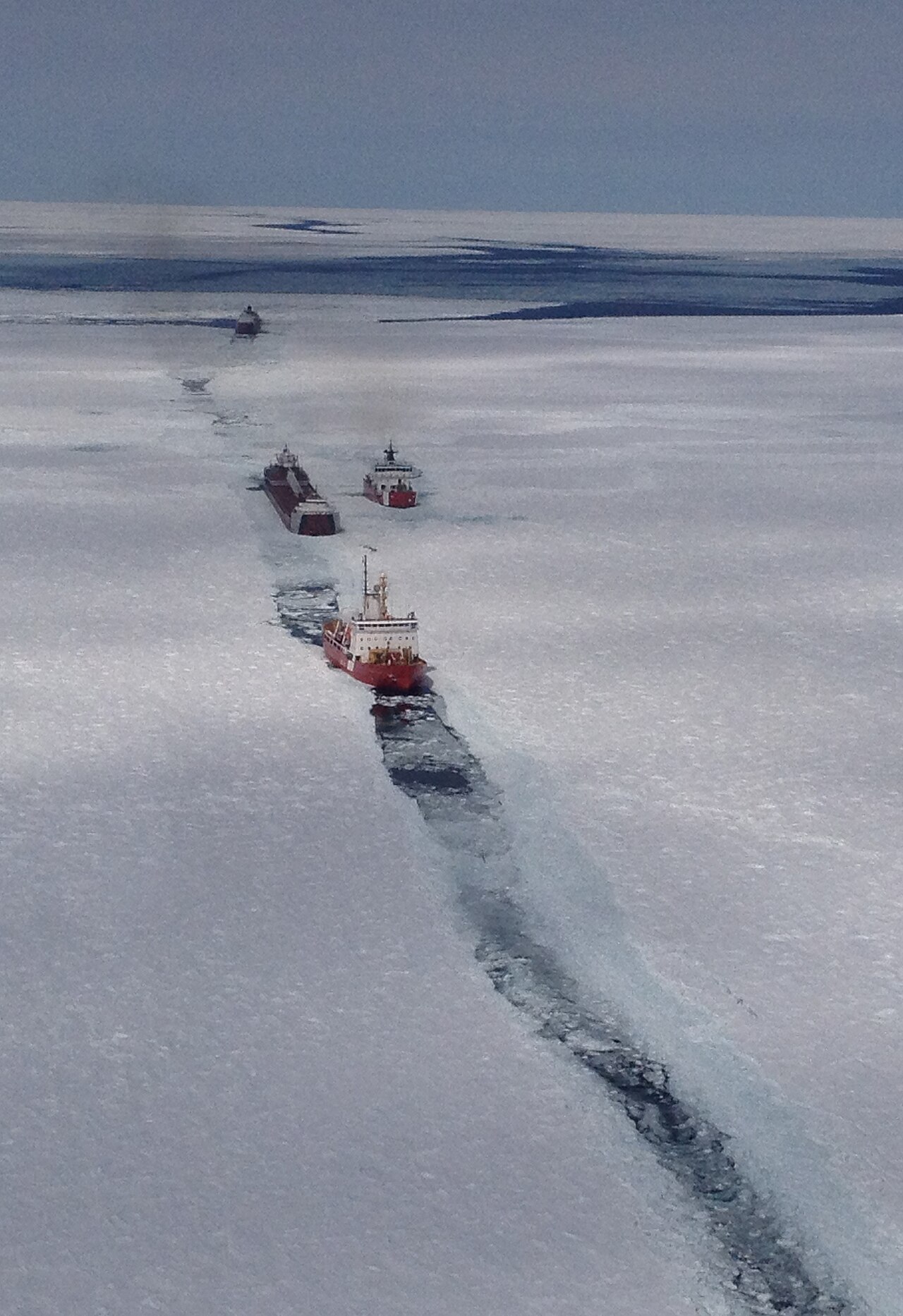
Radar in ice-infested waters
In short: ice is a poor radar target — use radar as one source only, on short range scales, with both X- and S-band, and remember that no echo does not mean no ice.
Training and information
- Polar training (STCW and the Polar Code): Advanced Polar (IMO model course 7.12) at management level · Basic Polar (7.11) for junior officers.
- Key reference: The Mariner’s Handbook (NP100).
- NAVTEX ice reports are message type C. Types A, B, D and L cannot be switched off on the receiver.
- Weather services and apps add to the picture — all part of “all available means” (COLREG Rule 5).
How ice shows on radar
- Cold does not harm the radar — but never rely on radar alone for ice; visual observation is preferred.
- Ice and snow reflect far less than steel: ice is a poor target beyond 3–4 NM; best working scale 2–3 NM.
- Flat ice bounces the pulse away like a mirror and gives little or no echo unless it has height (bergs, bergy bits, growlers). Low ice is still dangerous.
| What the screen shows | What it may really be |
|---|---|
| A dark patch like open water | A smooth floe |
| Small scattered echoes like floes | Sea birds |
| A sharp, prominent edge | The edge of a smooth floe (an open-water edge is not prominent) |
| No sea clutter where you expect it | Ice nearby damping the sea |
| Land within about 1 NM of the coast | Shore-fast ice — reduce gain to separate it from the land |
| Lines or ridges | Pressure ridges, ship tracks and rafted ice all look alike |
Radar settings for ice
- Adjust the gain with care.
- More power helps: a 50 kW set beats a 25 kW one.
- X-band shows more ice detail at short range (under 4 NM, short pulse). S-band detects ice and ridging further out. → Use both.
- Some radars have presets (harbour / open sea / ice). Dedicated ice navigation radars with enhanced 12-bit digital video show bergy bits and growlers far better — a standard set cannot match them with an “enhance” button.
- On X-band at 3 NM, speckle around own ship may just be sea clutter → confirm by lookout.
Icebergs
- Usual detection range: 4–15 NM, more for large bergs. A large berg with a cliff face may show at 15–20 NM; a small, low berg perhaps only at 3–4 NM.
- Low, smooth or snow-covered bergs give weak echoes. A berg may show only as a clutter-free shadow behind it; a gently sloping berg may not show at all.
- Bergs have underwater spurs → give them a wide berth.
Fixing in ice
- Ice along the shore hides the real coastline → take ranges and bearings with extra caution.
- Buoys are unreliable: dragged, hidden by ice or removed for the season.
- Charts of ice areas are often less accurate (short survey seasons) — do not over-rely on them.
Ship handling and signs of ice
- Ice-class ships have a reinforced ice belt at the waterline — about ±0.5 m around the summer draught, plating 3–5 times thicker.
- Enter ice at minimum speed. Avoid getting beset — head slowly for open water.
- Ice is near when: strong wind but no waves (no fetch over ice → pack ice upwind) · sea temperature drops · unexpected wildlife (gulls far offshore, resting on ice).
Choosing an anchorage and keeping an anchor watch
In short: choose the spot from chart and VTS, measure distances before letting go, record the let-go data, then watch fixed targets for dragging — alarms help, the lookout decides.
Approach and letting go
- Choose the anchorage from the chart and VTS information.
- Set the range scale to suit the distance to the anchorage and how crowded it is.
- Measure the distance to other anchored ships before letting go.
- Think in swing circles, not drop points. Anchor astern of a larger ship that has already settled (chain stretched out) rather than near one that has just let go.
- Most of the holding comes from the weight of the chain.
Once anchored
- Record heading and GPS position at the moment of letting go, then the length of chain paid out.
- Fix the position on conspicuous objects — plot a real fix (ranges and a bearing) even when GPS and radar give a readout.
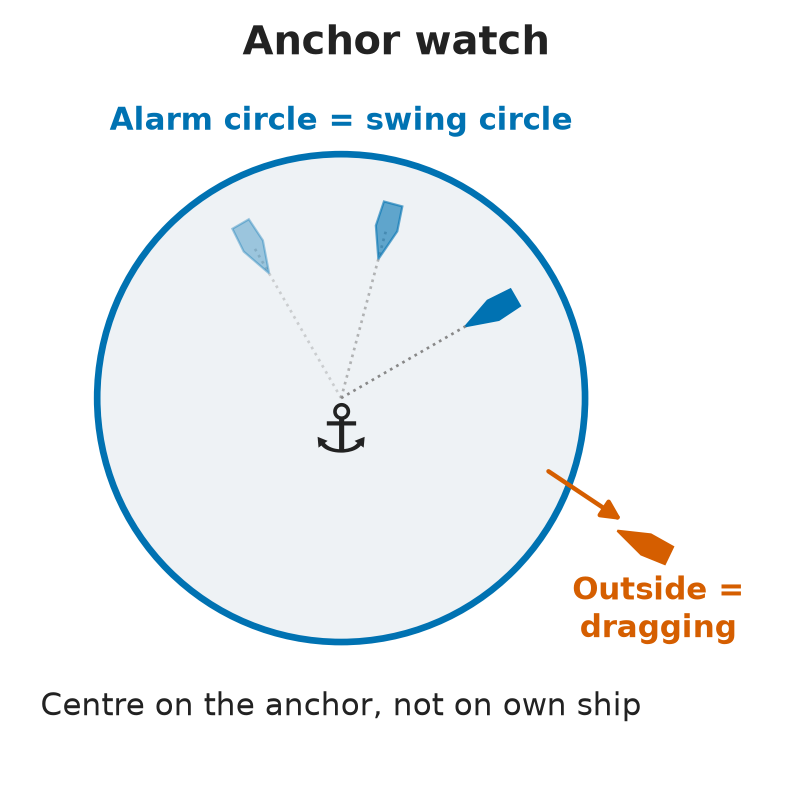
- Set the anchor watch alarm (radius and centre) from wind, waves, current and chain length. Caution: errors come from the anchor dredging before it bites and from the catenary of the chain.
- Set a guard zone to warn of approaching ships, in case either of you drags.
- An anchor alarm built with the radar maps function is only as accurate as the position-fixing system behind it.
- Caution: guard zones and alarms are aids only — the visual lookout goes on.
Checking for dragging
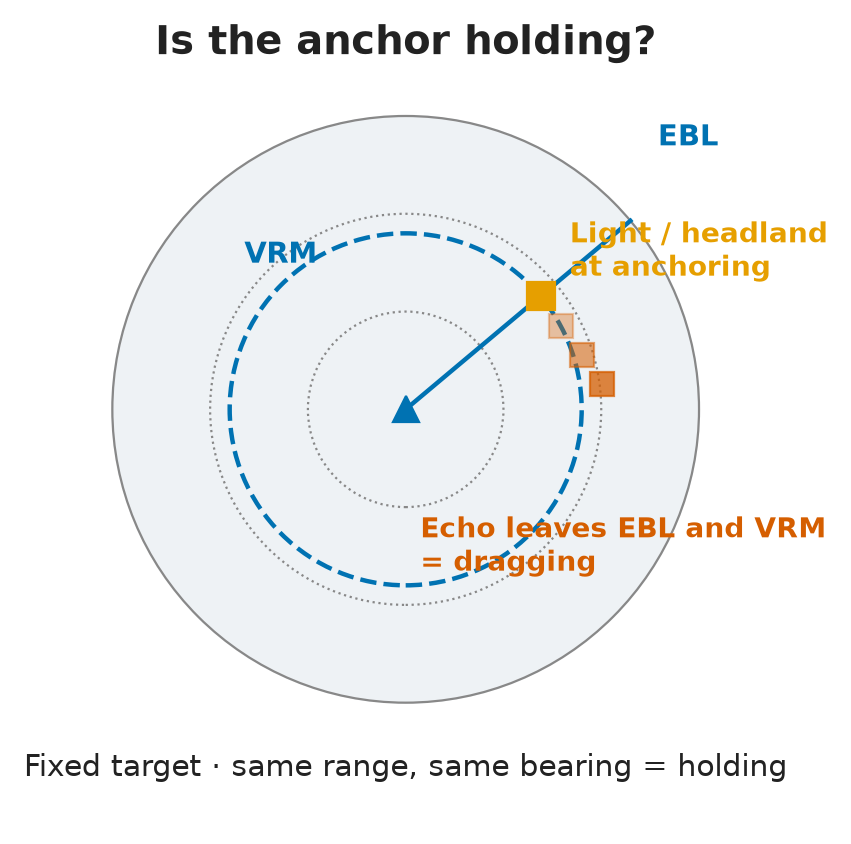
- Watch range rings, VRM and ERBL on fixed targets: ranges and bearings that keep changing mean the ship is moving.
- Some radars have an anchor mode (anchor icon). Its radius is the swing circle; leaving it gives a visual alert, then an audible one, possibly repeated in the Master’s cabin.
- No anchor mode? Centre a VRM on the anchor position (not on own ship) to mark the swing circle.
- Rough example: in 10 m of water with 40 m of chain, the chain reaches about 35 m horizontally. The circle traced by the position reference also includes the distance from the hawse pipe to where the position is taken.
- Other checks: transits and PI lines on the coastline, the GPS anchor alarm, SOG and COG, and a visual check of the chain (direction, vibration).
Berthing and unberthing with radar
In short: radar gives numbers for timing engine, thrusters, rudder and anchor — on a very short range scale — but the people at the mooring stations remain the best source.
Radar tools alongside
- Change the range scale for each phase. Berthing: 0.25–0.5 NM, at most 0.75 NM — the 1.5, 3, 6 and 12 NM scales are useless at the berth.
- VRM: distance to ships and obstructions ahead and astern, to the berth line, and timing for dropping the outside anchor.
- EBL or PI line: monitor the angle of approach to the berth.
- ECDIS predictor vectors show sideways motion and the turning path over the next few minutes.
Limits and other sources
- Know your blind and shadow sectors — the berth line may give no echo at all.
- Caution: radar range is the slant distance from scanner to object, not the horizontal distance — this matters very close to the berth.
- Reports from the mooring stations forward and aft (“clear to swing”, “x metres off”, “parallel to the breakwater”) are the best information and are preferred to radar for distances fore and aft.
- CCTV angles can mislead, and cameras fail.
- Current changes everything at low speed: a slow ship may make 12–13 kn over the ground at full ahead with the current and only 6–7 kn against it.
Worked scenario: night passage through an archipelago
In short: in narrow channels at night in rain, radar is the primary source — prepare the plan and the equipment first, keep the speed down, plan the turns and expect failures.
Situation: a 50 m motor yacht, draught 3 m, in the Stockholm archipelago at night, in restricted visibility with rain and light wind. About 13.9 NM to the destination, 40 minutes available.
Before getting underway
- Prepare a passage plan from the present position to the destination, and check it.
- Switch on all radars, AIS and ECDIS and check each for faults.
- Run the ECDIS route check and read every hazard it reports. Some are irrelevant, e.g. caused by a wrongly set safety contour; make sure the draught entered is correct.
- Set the rain clutter for the conditions.
- Load the route on the radar as well.
- Restricted-visibility routine: inform the Master, navigation lights on, fog signals, radar in use, extra lookout, safe speed and engines ready for immediate manoeuvre (MGN 315 (M); COLREG Rule 19(b)).
Through the channels
- Radar is the primary source: a continuous series of EBL/VRM bearings and ranges, PI lines where they help, and the ENC overlay as back-up.
- Stabilisation: ground-stabilised for the coastal passage; with traffic around, sea-stabilised with true and relative trails/vectors — as long as you can justify it.
- Keep to the starboard side of the channel (COLREG Rule 9(a)).
- Full speed is not required: slow down, or depart from the planned track and speed, whenever needed.
- Plan the turns: at speed, ships tend to swing wide in the bends → use wheel-over positions.
Expect failures
- Be ready for a loss of steering and an invalid position alert in the middle of the passage.
- Keep scanning every display for new flashing alerts, and listen for sound signals from outside.
⚡ Flashcards
Test yourself, one card at a timeQ1Coastal passage: what must the supervising officer check in the OOW's radar work?
Answer- Leading, PI and clearing lines set up right · position checked at intervals (EPFS + landmark fixes + estimated track) · radar fixes used to check the GPS
- False marks cleaned up with gain, brilliance, clutter, pulse length, display mode, the chart and the overlay
Common trapTrap: treating radar as the only means — it is a supplementary one
Q2An echo near the track looks doubtful on a radar with ENC overlay. What do you do?
Answer- Switch the overlay and synthetics off and read the raw radar — an input error can hide a real hazard under chart graphics
- Radar does not use GNSS, so an EBL/VRM fix on landmarks is a true cross-check of the GPS
Common trapTrap: trusting the overlay because it agrees with the GPS
Q3Best display mode when navigating near fixed objects with north at the top?
Answer- True motion, north-up (ground-stabilised): fixed echoes stay still
- Memory aid: navigation → true motion · collision avoidance → relative motion
Common trapTrap: relative motion — the land streams across the screen
Q4What are the main limits of radar?
Answer- Line of sight · affected by weather · weak on small or poor targets
Common trapTraps: “always accurate” · “immune to other radars” · “unlimited range in open sea” — reliable range is about 24 NM
Q5What is the point of no return in a narrow channel, and why are bends risky on radar?
Answer- Past it there is no room to stop or turn — plan it, with escape options such as turning basins, in a contingency plan for each leg
- In bends the shore hides targets, accuracy drops, false echoes and same-frequency interference increase
Common trapTrap: trusting the picture in a bend as much as on a straight stretch
Q6Dense fog, narrow channel, container ship 2.5 NM ahead, CPA 0.8 NM, no VHF reply. Action?
Answer- Reduce speed and prepare to take avoiding action — there is no stand-on vessel in restricted visibility (COLREG Rule 19)
Common trapTraps: keep course and speed · speed up and overtake · “head-on” in the wording only tells you the target is ahead
Q7How do you cross a TSS lane, and how do you make sure nobody misses a VTS reporting point?
Answer- Cross on a heading as nearly as practicable at right angles to the traffic flow (COLREG Rule 10(c))
- Put remarks or alarms on the radar map, or extra PI lines, before each reporting line. Malta: Valletta VTS Ch 12 · Marsaxlokk VTS Ch 14
Common trapTrap: crossing at a shallow angle, drifting along with the traffic
Q8Ice: beyond what range is it a poor target, which range scale works best, and which band?
Answer- Poor beyond 3–4 NM · best scale 2–3 NM
- X-band for detail under 4 NM (short pulse) · S-band for ice further out → use both
Common trapTrap: relying on radar alone — visual observation is preferred in ice
Q9Name the radar traps in ice. Why is "no echo" no comfort with icebergs?
Answer- Smooth floe looks like open water · sea birds look like floes · shore-fast ice looks like land · no sea clutter can mean ice is near
- Bergs usually show at 4–15 NM, but a low, smooth or gently sloping one may show only a shadow, or nothing
Common trapTrap: no echo = no iceberg
Q10At anchor: what do you record after letting go, and how do you check for dragging?
Answer- Heading + GPS position at let-go, then the length of chain; then plot a real fix on conspicuous objects
- Watch ranges and bearings of fixed targets (range rings, VRM, ERBL); no anchor mode → VRM centred on the anchor position
Common trapTrap: guard zone and alarm replacing the lookout — they are aids only
Q11Berthing by radar: which range scale, and why can the range to the berth mislead?
Answer- 0.25–0.5 NM, at most 0.75 NM
- Radar gives the slant range from the scanner, not the horizontal distance; the berth may sit in a blind or shadow sector
Common trapTrap: preferring radar to the reports from the mooring stations
Q12Night, rain, restricted visibility, narrow archipelago channels: which source is primary and how do you prepare?
Answer- Radar is primary: continuous EBL/VRM checks, PI lines, ENC overlay as back-up
- Before departure: all radars on and checked · ECDIS route check (safety contour, draught) · rain clutter set · route loaded on the radar
Common trapTrap: full speed and wide turns — slow down and plan wheel-over points
📚 Resources
Videos
- COLREGs Rule 9: Narrow Channels Explained | Complete Guide for Deck Cadets — Maritime Academia
- COLREGS RULE 10 - Traffic separation schemes | COLLISION REGULATIONS | MERCHANT NAVY KNOWLEDGE — Merchant Navy Knowledge
Books
- Radar and ARPA Manual: Radar, AIS and Target Tracking for Marine Radar Users, Alan Bole, Alan Wall, Andy Norris — 3rd edition (Butterworth-Heinemann, 2014)
- The Mariner’s Handbook (NP100), UK Hydrographic Office — latest edition; the ice chapters cover navigation in ice and the use of radar there
Regulations
- COLREG 1972 — IMO convention page — read Rules 5, 7, 9 (narrow channels), 10 (traffic separation schemes) and 19 (restricted visibility)
- Transport Malta Coastal Notice to Mariners — “Malta Vessel Traffic Services and use of international marine VHF channels” (latest issue) — Valletta VTS Ch 12, Marsaxlokk VTS Ch 14
Official sites
- IMO — Vessel Traffic Services — SOLAS V/12 and the VTS guidelines, IMO A.1158(32)
- Canadian Coast Guard — Ice Navigation in Canadian Waters — free official manual; chapter 4 covers navigation in ice-covered waters
Exam focus — Malta
Format: online multiple-choice theory (about 20 questions), some with a radar screenshot — eliminate the wrong options first, then look for the keywords. The practical part is a simulator run: expect a narrow-channel passage, equipment failures and alerts. Typical questions: (1) Fog in a narrow channel, ship ahead, small CPA → reduce speed and prepare to take avoiding action (Rule 19, no stand-on vessel). (2) Best display near fixed objects with north orientation → true motion, north-up. (3) Main limits of radar → line of sight, weather, poor targets. (4) How does ice show on radar, and why does no echo ≠ no ice? (5) How do you check for a dragging anchor → range rings / VRM / ERBL on fixed targets. What examiners want to hear: radar as one source among several and an independent check on GNSS; overlay off when an echo is doubtful; a contingency plan and point of no return for restricted waters; lower speed and extra lookout when the picture is poor; and a visual lookout that never stops.